Scam check · Guide
That "Your Parcel Is On Hold" Text: How to Spot a Fake in 30 Seconds
24 November 2026 · Nickel Choi
Short answer: this week almost everyone is waiting for a parcel, and scammers know it. If a text says your delivery is on hold and asks you to tap a link or pay a small fee, don't use the link. Open the app of the shop you ordered from and check your order there. If there's a real problem, it'll be there too.
Why this week
Fake delivery texts are the most-reported text scam in the US, according to the Federal Trade Commission. People reported losing $470 million to scams that started with a text in 2024, five times more than in 2020. The trick works because it's believable: in Black Friday week, a message about a parcel is exactly what you're expecting.
The fee is small on purpose, often a pound or two. Nobody thinks hard about £1.99. But the page asks for your full card details, and that's what the scammer is really after.
What a fake one looks like
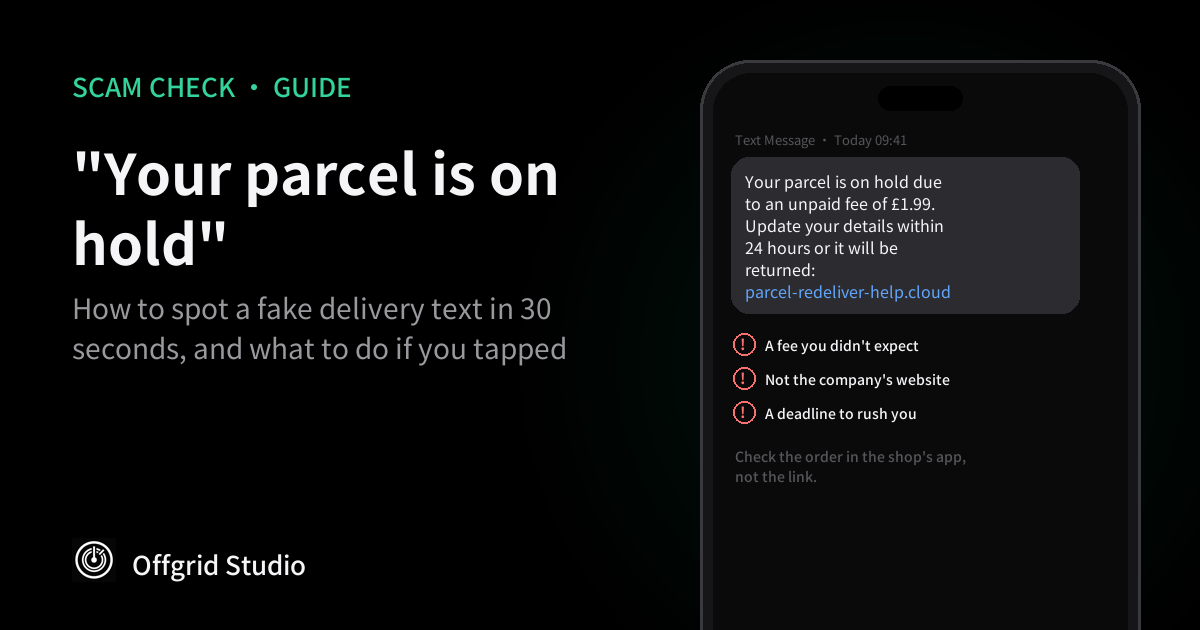
Here's the typical shape of the message (made up for this guide, but close to the ones people report):
Your parcel is on hold due to an unpaid shipping fee of £1.99. Please update your details within 24 hours or it will be returned: https://parcel-redeliver-help.cloud/uk
Three things give it away:
- A fee you weren't expecting. USPS says it does not charge a fee for redelivery. If a shop or carrier really needs money from you, it will show up in your order or account, not only in a text.
- A link that isn't the company's own website. Look at the address, not the words around it. Extra words, dashes and endings like .cloud or .top are a warning.
- A deadline. "Within 24 hours or it will be returned" is there to stop you checking.
The 30-second check
- Did I order something that's coming by this carrier? If not, it's a scam.
- Open the shop's app yourself. Not the link. Look up the order and its tracking there.
- Is there a problem there too? If the order looks fine, the text was fake. Delete it.
That's it. You don't need to judge the text at all; you just go round it. The FTC's advice is the same: if you weren't expecting a message, don't click any links.
If you already tapped
- Only opened the page? Close it, and don't type anything. Keep your iPhone updated.
- Entered card details? Call your bank on the number on the back of your card and ask them to block it. Do it now, not tomorrow. Scammers often test a stolen card with a tiny payment first.
- Entered a password? Change it on the real site, and turn on two-factor authentication.
- Then expect a follow-up. A call "from your bank" soon after is a common next step. Hang up and call the number on your card yourself.
Report it in 10 seconds
- If you see Report Junk under the message in Messages, tap it.
- Or forward the text to 7726 (it spells SPAM on a keypad). Mobile networks in the US and the UK use it to block similar messages.
- In the US you can also report it at ReportFraud.ftc.gov.
- Then delete it, and block the number.
One setting worth turning on: iPhone can sort texts from unknown senders into their own list, away from your contacts. Apple has the steps in its guide to filtering messages on iPhone.
A note from me
I'm Nickel, and I build iPhone apps on my own. Some of my apps go on Black Friday prices from Friday, so I'll be clear about how you'll hear about it: only on the App Store, this site and our Threads page. I don't have your phone number, and none of my apps asks you to make an account, so there's no login for anyone to phish. If a text ever claims to be from Offgrid, it isn't.
That's how I build everything: OffgridScribe, OffgridStem, OffgridVox and OffgridCam work on your iPhone without an account, so there's less of you out there to steal.
Your turn
What's the most convincing scam text you've had this year? Send it to us (cover your number first) in the replies on our Threads post or email [email protected]. I'll add the best examples to this guide, with your name, so the next person spots it faster.
Questions
Does USPS or Royal Mail text you to pay a redelivery fee?
USPS says it does not charge a fee for redelivery. Any text asking you to pay a small fee to release or redeliver a parcel should be treated as a scam until you've checked it yourself in the carrier's or shop's own app or website.
What should I do if I tapped the link in a scam text?
Tapping alone is usually not the problem; typing details in is. If you entered card details, call your bank on the number on the back of your card and ask them to block it. If you entered a password, change it and turn on two-factor authentication. Then watch your statements for small test payments.
How do I report a scam text on iPhone?
Use Report Junk in Messages if it appears under the message, or forward the text to 7726, which spells SPAM. Mobile networks in the US and the UK use 7726 to block similar messages. In the US you can also report it at ReportFraud.ftc.gov. Then delete it.
How do I check if a delivery text is real?
Don't use the link. Open the app or website of the shop you ordered from, or type the carrier's address yourself, and look up your order there. If there's a real problem, it will show up in your order.
How we checked this
The figures on text scams are from the FTC's data release of 16 April 2025 (the latest it has published), covering 2024. Advice on links and 7726 is from the FTC's spam text guide. The redelivery fee line is from USPS. The iPhone filtering steps are from Apple Support. The sample text is made up for this guide.
More from Offgrid Studio
More Tech Outages Are Coming: A 2-Minute iPhone Checklist
If an AI Agent Spends Your Money, Who Pays?
How to Check If an iPhone App Uploads Your Data